Stream and Run
The two adapters an Agent uses to talk to a Haystack model: Stream (streaming chat) and Run (non-streaming calls).
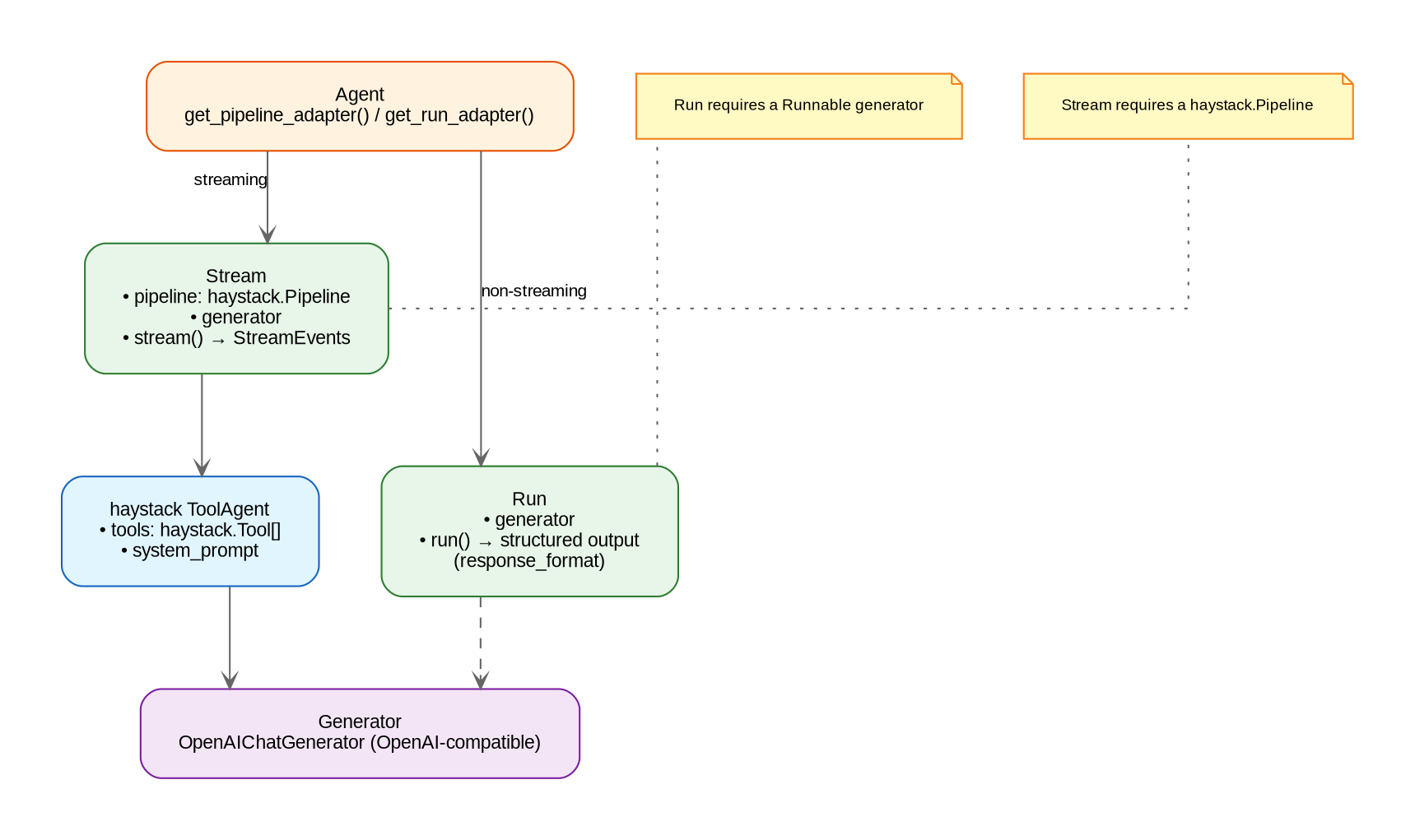
| Adapter | Purpose | Powered by |
|---|---|---|
Stream |
Streaming chat | A haystack.Pipeline (usually a ToolAgent) |
Run |
Non-streaming calls | A generator with .run() |
An agent exposes one of each via get_pipeline_adapter() and get_run_adapter().
Run
Run wraps a generator for single-shot calls. It converts internal ChatMessages to Haystack messages, runs the generator, and returns one reply.
Run(
    generator: Any,        # Haystack chat generator with .run(), e.g. self.get_llm()
    model: str | None = None,
    instructions: str | None = None,
)
response = await run.run(
messages: list[ChatMessage],
system_prompt: str | None = None,
response_format: type[T] | None = None,
) # -> T | str | None- Without
response_format, returns the reply text as astr. - With
response_format, passes the Pydantic model’s JSON schema as the generation’sresponse_formatand returns a validated instance.
from pydantic import BaseModel

class Movie(BaseModel):
    title: str
    year: int

class MyAgent(Agent):
    async def get_run_adapter(self, thread_id=None, user=None):
        return Run(generator=self.get_llm())

    # agent.run(messages, response_format=Movie) -> Movie
    # agent.run(messages) -> str
Run.get_messages() keeps only user and assistant messages and converts them to Haystack ChatMessages; a system_prompt passed to run() is prepended as a system message.
Run only ever wraps a plain generator — it has no notion of tools, and never
has. Two earlier shapes tried to give it one (Run(agent=prebuilt_agent), then
Run(generator, tools=[...])) and were both deleted: both had zero real
callers, and the second built an ungoverned Haystack Agent from a generic
step-cap setting instead of the calling agent’s own limits — a real subagent
class run headless would have silently lost its own max_agent_steps. See
Headless tool runs below for the shape that replaced
them.Headless tool runs
An Agent can run its own tools to completion without streaming — no
Stream, no SSE connection, no client reading chunks. One call in, one final
answer out: a workflow step, a scheduled job, a management command — anything
that needs tool access but has nobody watching a live response.
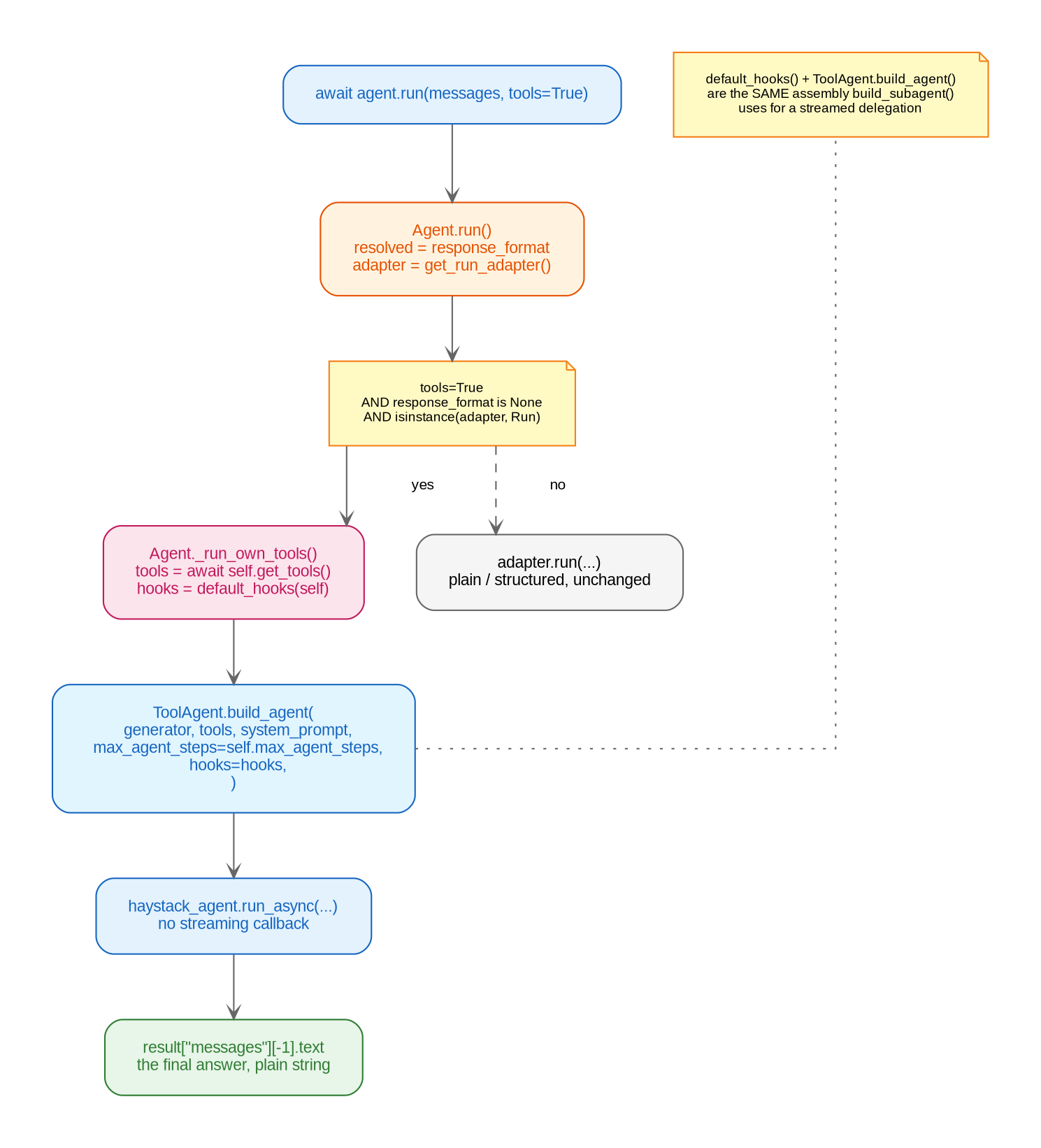
answer = await agent.run(messages, tools=True)Agent.run() takes the headless path only when three conditions all hold:
resolved = self.response_format if response_format is self._UNSET else response_format
adapter = await self.get_run_adapter(thread_id=thread_id, user=user)

if tools and resolved is None and isinstance(adapter, Run):
    return await self._run_own_tools(adapter, messages, rendered_prompt, thread_id, user)

return await adapter.run(messages=messages, system_prompt=rendered_prompt, response_format=resolved)toolsisTrue— opt-in. Resolving tools means callingself.get_tools(), which reaches every configured integration; a one-shot call (title generation, structured extraction) never pays that cost unless it explicitly asks for it.resolved is None— noresponse_format. Structured output and a tool loop together aren’t supported: see Structured output from a tool loop. If both are set,response_formatwins silently and tools are never resolved.isinstance(adapter, Run)— only the SDK’s own plainRunis ours to add a tool loop to. Aget_run_adapter()override that returns something else made that choice on purpose and is left alone, calling its own.run()unchanged.
Agent._run_own_tools() then builds the loop:
haystack_agent = ToolAgent.build_agent(
    getattr(adapter, "generator", None) or self.get_llm(),
    await self.get_tools(thread_id=thread_id or "", user=user),
    system_prompt,
    max_agent_steps=self.max_agent_steps,
    hooks=default_hooks(self),
)
result = await haystack_agent.run_async(messages=adapter.get_messages(messages))
return result["messages"][-1].text if result.get("messages") else None
This is the same assembly build_subagent() uses to turn a subagent into
a real Haystack Agent for streamed delegation (see Subagent
Delegation) — default_hooks(self) and
max_agent_steps=self.max_agent_steps are the calling agent’s own governance,
not a generic constant. A class with max_agent_steps = 4 gets 4 steps
whether it’s delegated to live or run headless by itself; one function,
default_hooks(), is the single place that assembly exists.
The return is just the last message’s text — no digest, no sources-consulted
list, no synthesis-pass recovery if the loop got cut short. That machinery
(subagent_response()) exists specifically for the coordinator/subagent
handoff, where a lost result means a lost answer to the user mid-conversation.
A headless run has no ongoing conversation to lose context from — the caller
gets back whatever the last message says, cut short or not.
agent.run(tools=True) yet — not in django_ai_sdk,
not in the demo project. The mechanism is tested and correct, but there’s no
example to copy from; a workflow step that needs tool access is the obvious
first real caller.Stream
Stream wraps a Haystack pipeline and normalizes its streaming output into StreamEvents.
Stream(
    pipeline: Pipeline,                          # haystack.Pipeline instance
    generator: Any,                              # generator used for streaming
    store: bool = True,                          # persist the reply
    storage_adapter: BaseStorageAdapter | None = None,
    citation_registry: CitationRegistry | None = None,
    suggestion_generator: SuggestionGenerator | None = None,
)
pipeline must be a real haystack.Pipeline: anything else raises TypeError. A ToolAgent exposes its pipeline via tool_agent.pipeline().Pipeline vs Agent Component
If the pipeline’s first component is a Haystack Agent, Stream calls agent.run_async(...) directly with the streaming callback. Otherwise it runs pipeline.run_async({"messages": ...}). Both paths stream chunks through a queue that Stream.get_events() consumes as events.
stream()
stream() is an async generator:
async for event in stream.stream(messages: list[ChatMessage]):
    ...  # handle StreamEvent
Order of operations:
- Convert
ChatMessages to Haystack messages (merge_messagescontrols consecutive-message merging). - Generate the
message_idUUID exactly once. - Create a
StreamWriter(whenstoreand astorage_adapterare set). - Attach the streaming callback to the generator, warm it up if it has
warm_up. - Yield
MessageStartEvent, live events,MessageEndEvent, optionalSuggestionEvent, thenStreamEndEvent.
Examples
Stream a ToolAgent
stream = Stream(
    pipeline=tool_agent.pipeline(),
    generator=generator,
    storage_adapter=storage,
    citation_registry=await agent.get_citation_registry(),
    suggestion_generator=agent.suggestion_generator,
)
Stream a Bare Pipeline
pipeline = Pipeline()
pipeline.add_component("prompt", ChatPromptBuilder(template=[...]))
pipeline.add_component("llm", generator)
pipeline.connect("prompt.prompt", "llm.messages")

stream = Stream(pipeline=pipeline, generator=generator)
async for event in stream.stream(messages):
    ...
Next: Stream Events, what stream() yields.