How It Works
This page explains what happens under the hood when a request flows through the SDK. You don’t need to know this to use it, but it helps when extending or debugging things.
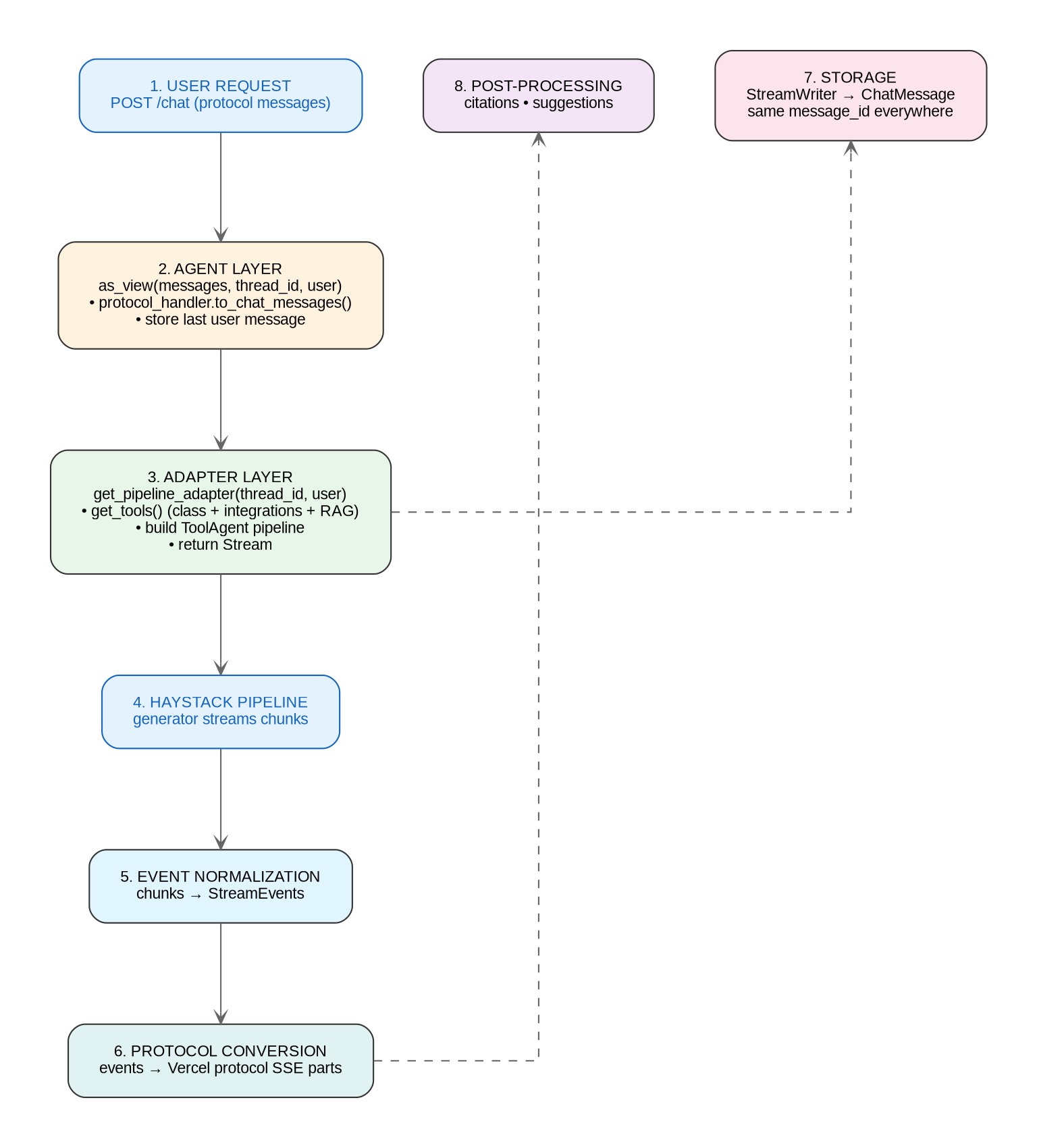
Request Lifecycle
When a client sends a chat message:
1. Django view receives POST with protocol messages + thread_id
2. View calls: agent.as_view(payload.messages, thread_id=..., user=...)
3. as_view() checks CHAT permissions
4. Protocol handler converts messages:  VercelProtocolHandler.to_chat_messages()
5. If thread_id provided:
   - Resolves the storage adapter for the thread
   - Stores the newest user message
6. get_pipeline_adapter(thread_id, user) builds a Stream (Haystack pipeline)
7. stream_response(adapter, messages, protocol_handler) returns StreamingHttpResponse
8. Client starts receiving events as they stream
Inside the streaming response:
9.  protocol_handler.sse(adapter, messages) starts iterating
10. adapter.stream(messages) yields StreamEvent objects
11. Protocol handler converts each event to its wire format (Vercel SSE)
12. Each event is serialized: "data: {...}\n\n"
13. StreamWriter aggregates chunks into a complete ChatMessage
14. On completion, StreamWriter.finalize() persists the assistant message
15. Stream terminates with "data: [DONE]\n\n"
ChatMessage
ChatMessage (django_ai_sdk.common) is the single message type that flows through the whole system. It starts simple and gets richer as it moves through the pipeline:
from django_ai_sdk.common import ChatMessage

# Input: simple
user_msg = ChatMessage(role="user", content="Tell me a joke")

# After streaming: rich with metadata
assistant_msg = ChatMessage(
    role="assistant",
    content="Why don't pirates shower before a battle?",
    id="msg_abc123",
    model="openai/gpt-oss-120b",
    finish_reason="stop",
    tool_calls=[...],   # if tools were used
    sources=[...],      # citation references if RAG ran
    errors=[...],       # if anything went wrong
    processing_time_ms=1250,
)
There’s no separate “input message” vs “storage message” type. The same class handles both: optional fields default to empty/zero.
The message_id
One message_id is generated in Stream.stream() as a UUID and used everywhere:
MessageStartEvent(message_id=...): sent to the frontend first- The
StreamWriterbuilds theChatMessagewith that same id - Storage persists it under that id
- Later operations (rating, deleting, restoring) reference the same id
The frontend never sees one id and the database another.
Streaming Events
Adapters don’t produce protocol-specific output. Stream.stream() yields normalized StreamEvent objects that any protocol handler can consume:
# Message lifecycle
MessageStartEvent(message_id="msg_abc123")
TextChunkEvent(content="Hello")
TextChunkEvent(content=" world!")
MessageEndEvent(finish_reason="stop")
StreamEndEvent()

# Tool usage
ToolCallStartEvent(tool_call_id="tool_1", tool_name="get_today")
ToolInputCompleteEvent(tool_call_id="tool_1", tool_name="get_today", tool_input={})
ToolOutputEvent(tool_call_id="tool_1", tool_output={"today": "2026-08-10"})

# RAG citations
SourceEvent(index=1, title="Quarterly report", source_id="doc:chunk", ...)

# Follow-up suggestions
SuggestionEvent(suggestions=["Tell me about the revenue", "Summarize it"])

# Errors
ErrorEvent(error_code="rate_limited", ref="3f9a1c02")
The full set: MessageStartEvent, TextChunkEvent, ReasoningChunkEvent, DataEvent, ToolCallStartEvent, ToolInputChunkEvent, ToolInputCompleteEvent, ToolOutputEvent, SourceEvent, SuggestionEvent, MessageEndEvent, ErrorEvent, StreamEndEvent.
StreamWriter
When a Stream is created with store=True and a storage_adapter, it sets up a StreamWriter that aggregates chunks into a complete ChatMessage:
from django_ai_sdk.common import StreamWriter, MessageChunk

writer = StreamWriter(
    message_id="msg_abc123",   # the message_id from MessageStartEvent
    model="openai/gpt-oss-120b",
    storage_callback=storage_adapter.storage_callback,
)

# During streaming, chunks are added:
writer.add_chunk(MessageChunk(type="text", content="Hello"))
writer.add_chunk(MessageChunk(type="text", content=" world"))

# After streaming completes:
complete_message = await writer.finalize("stop")
# -> Stores the ChatMessage via the storage callback
MessageChunk types: text, reasoning, tool_call_start, tool_input, tool_output, error.
Storage
Models
The django_ai_sdk.conversation app provides two models:
- Thread: a conversation container with
id(UUID),title,agent_id,metadata, timestamps. - Message: a single message in a thread with
id(UUID, the stream’smessage_id), a thread FK, and the serializedChatMessage.
How storage gets wired
You don’t manually store messages. When you pass thread_id to as_view():
get_storage_adapter(thread_id)locates the adapter that holds the thread (querying all registered adapters) and falls back to the agent’s configuredstorage_adapter.- The newest user message is stored immediately via
storage_adapter.store_chat_message(). - The storage adapter is handed to
get_pipeline_adapter()and set on the returnedStream. Stream.stream()creates aStreamWriterwithstorage_callback=storage_adapter.storage_callback.- When streaming finishes,
StreamWriter.finalize()calls the callback, storing the assistant message.
If you don’t pass thread_id, no storage happens: messages stream through and are gone.
thread_id to as_view() whenever a conversation should persist. Without it, streaming still works but nothing is saved.Custom storage
Implement BaseStorageAdapter to store conversations anywhere:
from django_ai_sdk.storage.base import BaseStorageAdapter

class FileStorageAdapter(BaseStorageAdapter):
    async def store_chat_message(self, chat_message):
        # Store individual messages (called for user messages)
        ...

    async def storage_callback(self, chat_message):
        # Store the assistant's completed message however you want
        ...

    async def get_messages(self):
        # Return messages for history
        ...
Register it in the adapter registry so get_storage_adapter() can find threads stored in it:
from django_ai_sdk.storage.base import StorageAdapterRegistry

StorageAdapterRegistry.register(FileStorageAdapter)
The stream_response() Function
This is the low-level function that as_view() calls. Use it directly when you want a custom view that assembles its own adapter:
from django_ai_sdk.responses import stream_response
from django_ai_sdk.protocols.vercel import VercelProtocolHandler

async def my_custom_view(request):
    adapter = ...  # a Stream, or an async factory returning one
    messages = [...]  # list[ChatMessage]

    return await stream_response(
        adapter=adapter,
        messages=messages,
        protocol_handler=VercelProtocolHandler(),
    )
It returns a StreamingHttpResponse with content_type="text/event-stream", CORS headers, and the x-vercel-ai-ui-message-stream: v1 header for Vercel-compatible frontends.